Shenzhen Xingtong IOT Technology Co., Ltd.
Barcode Scanner Manufacturer with development & Invention ability

Many OEM projects experience barcode scanning problems long before the first prototype is built.
The reason is simple: the scanner module was selected before the application requirements were clearly defined.
Choosing an embedded barcode scanner is not just about reading QR codes. The right module depends on how, where, and what you need to scan.
Before comparing specifications or requesting quotations, answer these five questions.
1. What Will You Scan?
This is the first question every engineer should answer.
Different applications require different scanning capabilities.
For example:
Product labels
QR codes
Data Matrix codes
Mobile phone screens
Electronic component labels
Medical sample tubes
Passport MRZ codes
A scanner designed for retail labels may not perform well when reading tiny Data Matrix codes or high-density QR codes.
Always define the barcode type before selecting the scan engine.
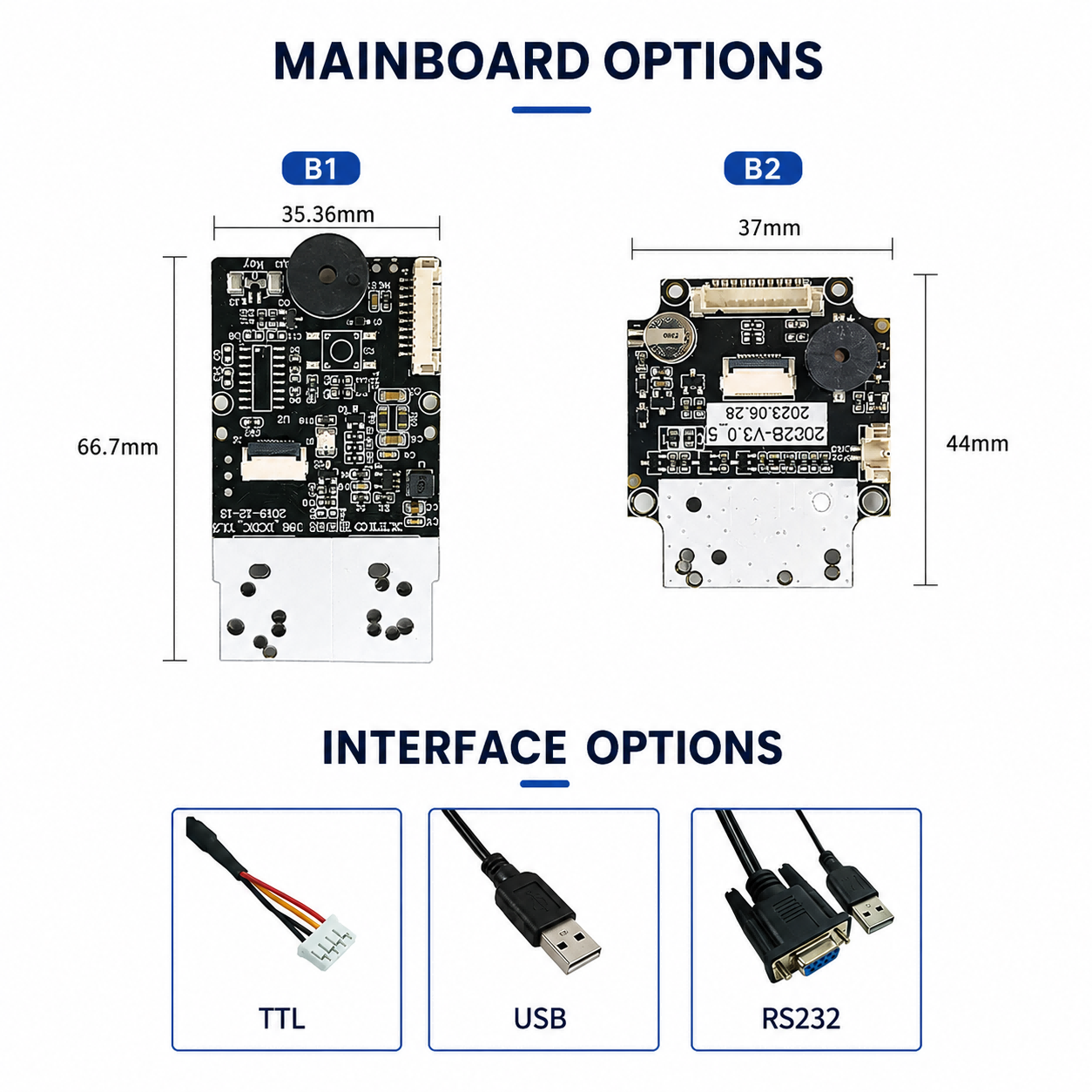
2. How Much Installation Space Is Available?
Many engineers select a scanner first and measure the available space later.
This often leads to mechanical redesign.
Before choosing a module, confirm:
Maximum installation height
Maximum installation width
Cable routing space
Distance to the scan window
A compact module is often easier to integrate into kiosks, payment terminals, handheld devices, and other embedded products.
3. Which Interface Does Your Mainboard Support?
One of the most common questions from OEM customers is:
"Should I choose USB, TTL, or RS232?"
The answer depends on your controller.
Choose:
USB if your device uses an industrial PC, Mini PC, or Android board with a USB host port.
TTL if your scanner will communicate directly with an MCU.
RS232 if your controller or PLC already provides a serial communication interface.
Selecting the correct interface at the beginning can eliminate unnecessary converters and simplify system integration.
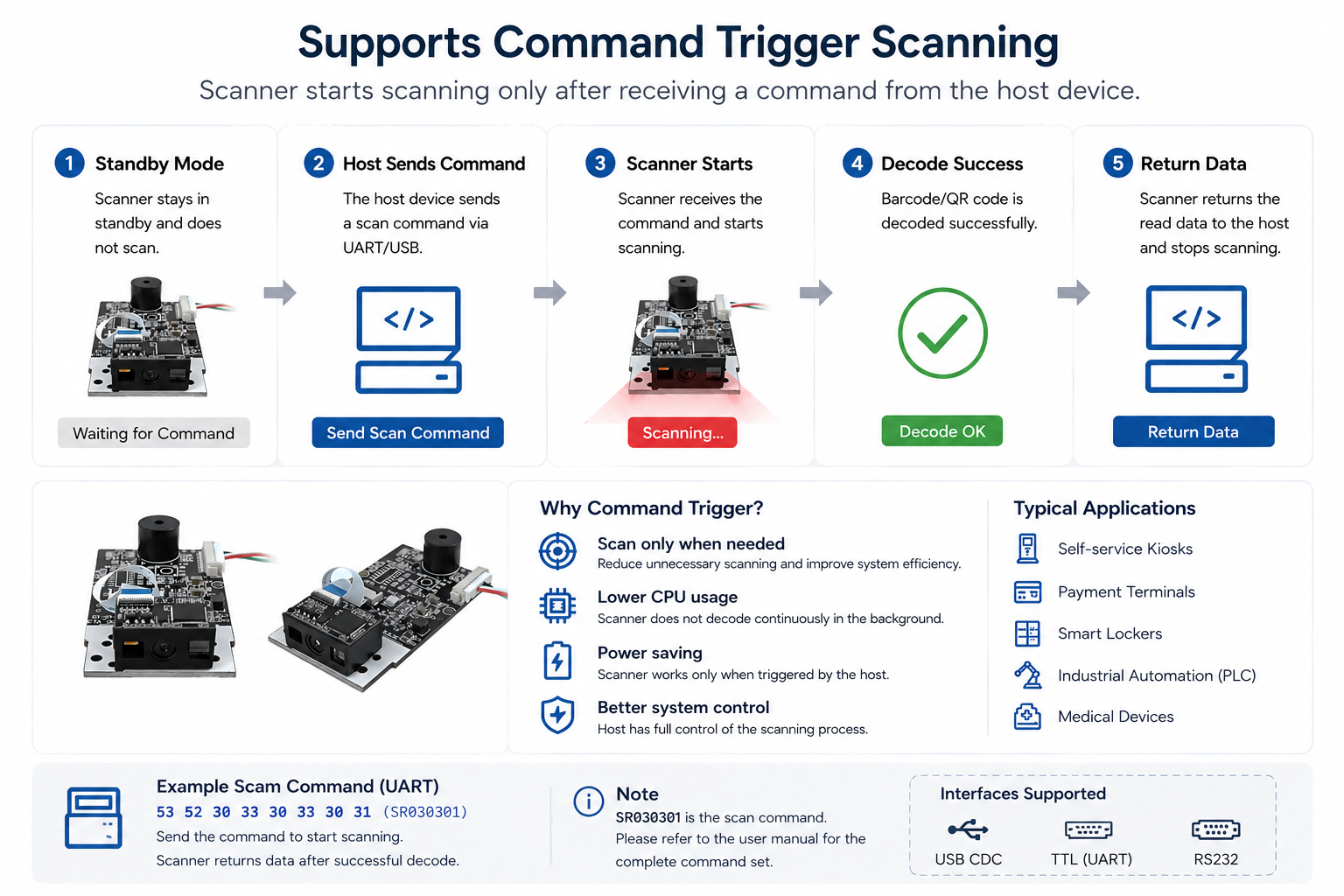
4. How Will the Scanner Be Triggered?
Not every application requires continuous scanning.
Typical trigger methods include:
Continuous Scanning
Presentation Mode
Sensor Trigger
Host Command Trigger
For automated equipment, Host Command Trigger is often the preferred choice because the scanner only activates when the controller sends a command.
This reduces unnecessary scanning and gives the system complete control over the reading process.
5. Where Will the Scanner Be Installed?
The installation environment has a direct impact on scanner selection.
Questions to consider include:
Will the scanner be mounted behind glass?
Is the installation space limited?
Will the device operate outdoors?
Is there strong ambient lighting?
Will the scanner be exposed to vibration?
These factors are just as important as decoding performance.
Ignoring them often leads to unstable scanning after the product enters production.
A Better Selection Process
Instead of comparing scanner specifications first, experienced OEM engineers usually follow this order:
Define the barcode type.
Confirm the installation space.
Identify the controller interface.
Select the trigger mode.
Evaluate the installation environment.
Compare scanner modules.
This approach reduces development time and avoids costly hardware redesign later in the project.
Frequently Asked Questions
Is a higher-resolution scanner always better?
Not necessarily. A higher-resolution sensor is beneficial for small or high-density codes, but many standard applications work perfectly with lower resolutions.
Can I change the interface later?
Changing the interface after hardware design may require PCB modifications or additional converters. It is better to determine the required interface before selecting the scanner.
Which trigger mode is best for kiosks?
Many self-service kiosks use Presentation Mode or Host Command Trigger, depending on the application workflow.
Why is installation space so important?
Even excellent scanners can become difficult to integrate if the available mechanical space is not considered during the design stage.
Conclusion
The best embedded barcode scanner is not simply the one with the highest specifications.
It is the one that matches your barcode type, installation space, controller interface, trigger method, and operating environment.
Answering these five questions before selecting a scanner module can save weeks of redesign and help ensure a smoother OEM integration process.


