Shenzhen Xingtong IOT Technology Co., Ltd.
Barcode Scanner Manufacturer with development & Invention ability

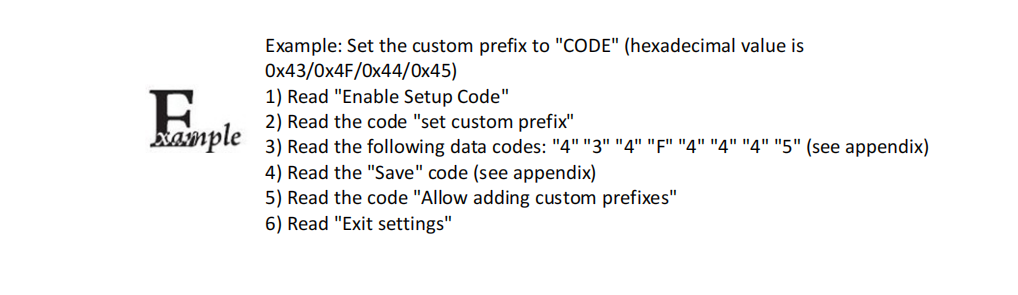
The prefix and suffix settings of barcode scanner are usually to automatically add specific characters or data when scanning barcodes to meet specific application requirements. The following is a clear step and instruction for setting the prefix and suffix of the barcode scanner:
1. Add prefix
Scan the add prefix barcode: First, you need to find and scan the "add prefix" barcode provided in the barcode scanner manual or software.
Find the character number: Find the prefix character to be added and its corresponding number in the ASCII table. For example, if the prefix is "#", its corresponding hexadecimal number may be "23".
Scan the data setting code: If the prefix character number is a two-digit hexadecimal number (such as "23"), you need to convert it into two separate values (high and low).
Use the barcode scanner to scan the corresponding data setting code. For "23H", you may need to scan "NO#2" (representing the high bit) first, and then scan "NO#3" (representing the low bit).
Allow prefix output: Finally, scan the "Allow prefix output" barcode to confirm that the prefix setting is successful.
2. Add suffix
Scan the add suffix barcode: Find and scan the "add suffix" barcode.
Find character number: Find the suffix character to be added and its corresponding number in the ASCII table.
Scan data setting code: Similar to the prefix setting, convert the number of the suffix character into two independent values and scan them with a barcode scanner.
Allow suffix output: Scan the "allow suffix output" barcode to confirm that the suffix setting is successful.

3. Notes
Manual reference: Different barcode scanner brands and models may have different setting methods and barcodes. Therefore, it is recommended to refer to the user manual of the specific device or contact the device manufacturer for an accurate setting guide.
ASCII table: The ASCII table is used to map characters to their corresponding numerical values (usually hexadecimal numbers). You need to know how to find the number of a specific character in order to correctly set the prefix and suffix.
Save settings: After completing the prefix and suffix settings, make sure to save the settings to prevent the settings from being lost after the device is restarted.
Test verification: Before formal use, be sure to perform a test verification to ensure that the prefix and suffix are correctly set and working properly.
If you need technical support, please contact our sales, sales03@szxtiot.com
ASCII Table:


