Shenzhen Xingtong IOT Technology Co., Ltd.
Barcode Scanner Manufacturer with development & Invention ability

What Customers Want: Automatic Data Capture
Many businesses—hotels, airlines, car rental agencies, and banks—search for scanners that can automatically capture traveler information from passports and populate data fields in their systems. The goal is to eliminate manual data entry, reduce errors, and speed up customer processing.
However, a key point often misunderstood: the scanner itself does not fill data into your system. The scanner captures the data and sends it as a stream of characters (like a keyboard typing). How that data is parsed, formatted, and inserted into your software fields is handled by your own application, not by XTIOT.
What XTIOT Scanners Do: Capture and Output Data
XTIOT passport scanners are hardware devices that:
Capture the Machine Readable Zone (MRZ) from passports, ID cards, and visas
Decode the information into readable text
Output the data via USB, TTL, or RS232 interfaces
The scanner behaves like a keyboard (in USB-HID mode) or sends data as a serial stream (in USB-VCOM or RS232 mode). When a passport is scanned, the data is transmitted as if typed by a keyboard—for example:
P<USADOE<<JOHN<<<<<<<<<<<<<<<<<<<<<<<
A12345678USA8010101M2501011<<<<<<<<<<<<<<00
It is then up to your own software to:
Parse the MRZ string into individual fields (name, document number, date of birth, expiry date, nationality)
Map those fields to the appropriate input boxes in your system
Add line breaks, tabs, or other formatting as needed
XTIOT Products for Passport Scanning
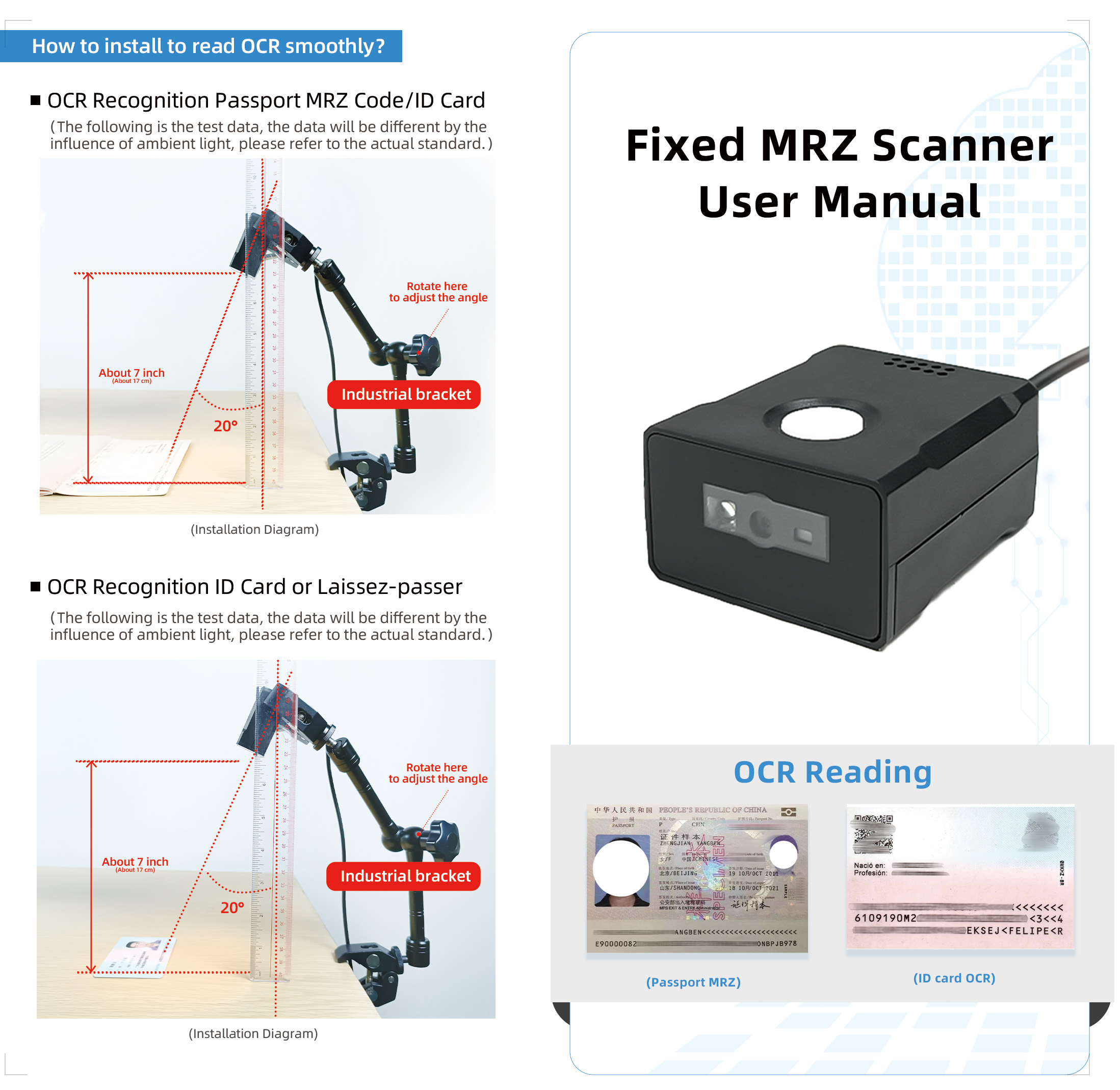
XT2010MRZ Fixed-Mount Passport Scanner
The XT2010MRZ is designed for reading Machine Readable Zone (MRZ) codes on passports, ID cards, and travel documents .
Key Specifications:
| Feature | Specification |
|---|---|
| Scan Speed | 300 scans/sec |
| Image Sensor | 1280×800 CMOS |
| MRZ Support | Passport OCR, Passport Visa, TD1, TD2 (ICAO compliant) |
| Interfaces | USB, TTL, RS232 |
| Output Mode | USB-HID (keyboard emulation) or USB-VCOM (serial) |
| Data Format | Raw MRZ string or configurable output (prefix/suffix) |
How It Works in Your System:
Scanner captures MRZ data
Scanner sends data as keyboard input (or serial stream)
Your application receives the data
Your software parses and populates fields
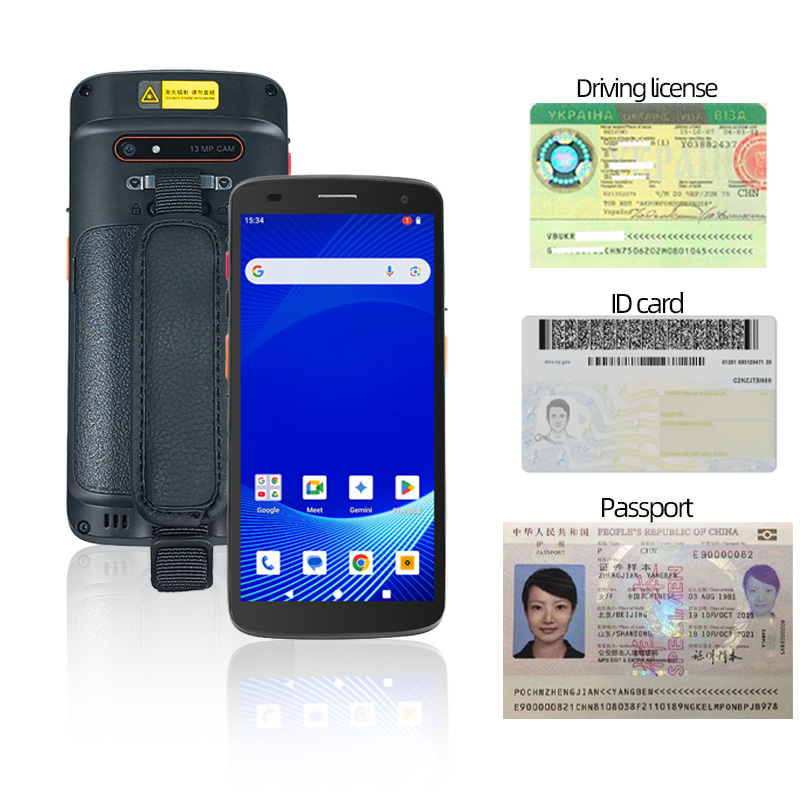
XT8002C Android PDA – Mobile Passport Scanner
The XT8002C is a rugged Android PDA that reads both MRZ and e-Passport RFID chips . It runs on Android 15 and supports custom application development via SDK.
Key Specifications:
| Feature | Specification |
|---|---|
| MRZ Reading | ICAO-compliant passport and ID card MRZ |
| RFID Reading | e-Passport chip (ISO 14443) |
| Operating System | Android 15 with 8-core CPU, 4GB RAM, 64GB ROM |
| Connectivity | 4G/3G/2G, WiFi (2.4G/5G), Bluetooth, GPS |
| SDK Support | Yes—for custom application development |
How It Works in Your System:
Custom app on the XT8002C captures MRZ data
Your app parses the data and populates fields within the app
Data is then transmitted to your backend PMS, CRM, or ERP via WiFi or 4G
How Data Gets into Your System: The Development Process
Since XTIOT does not provide software to fill your data fields, you (or your developer) need to build a simple application that:
Step 1: Receive the Data
The scanner acts as a keyboard (USB-HID mode). When a passport is scanned, data appears as if typed:
P<USADOE<<JOHN<<<<<<<<<<<<<<<<<<<<<<<
A12345678USA8010101M2501011<<<<<<<<<<<<<<00
Step 2: Parse the MRZ String
Your software must parse the raw MRZ into meaningful fields:
| Field | Extracted Value |
|---|---|
| Document Type | P (Passport) |
| Country Code | USA |
| Surname | DOE |
| Given Name | JOHN |
| Passport Number | A12345678 |
| Nationality | USA |
| Date of Birth | 1980-01-01 |
| Gender | M |
| Expiry Date | 2025-01-01 |
Step 3: Map to System Fields
Your software then maps parsed data to your system's input fields:
Name → Guest Name field
Passport Number → ID Document field
Expiry Date → Document Expiry field
Date of Birth → Date of Birth field
Step 4: Add Formatting (Line Breaks, Tabs, etc.)
Your application can insert:
Tab characters to move between fields
Enter/Return to submit forms
Prefixes/Suffixes to match your data format
Note: XTIOT scanners do support basic prefix/suffix configuration (up to 10 characters) via programming barcodes, but complex field mapping and auto-population require custom software development.
Application Scenarios
Scenario 1: Hotel Check-in System
Your Setup: Hotel PMS running on a Windows PC at front desk.
How It Works:
Front desk staff places passport under XT2010MRZ scanner
Scanner sends MRZ data (as keyboard input) to the PC
Your custom hotel software (or a simple script) intercepts the data
Software parses MRZ, extracts guest name, passport number, nationality, date of birth, expiry date
Software automatically fills these fields in the PMS guest registration screen
Staff completes check-in in seconds
Development Required: Custom integration software or script that listens for scanner input, parses MRZ, and maps to PMS fields.
Scenario 2: Airport Check-in Kiosk
Your Setup: Self-service kiosk running Windows/Linux with airline check-in application.
How It Works:
Passenger places passport in the scanner slot
Scanner sends MRZ data to the kiosk
Airline application (with built-in MRZ parsing) receives the data
Application extracts passenger details and retrieves booking information
Passenger confirms details and proceeds to bag drop
Development Required: MRZ parsing module integrated into the airline check-in application.
Scenario 3: Mobile Check-in with Android PDA
Your Setup: Hotel staff using XT8002C Android PDA with custom check-in app.
How It Works:
Staff opens custom check-in app on XT8002C
Staff scans guest passport using integrated scanner
App captures MRZ data
App parses MRZ and populates guest profile fields within the app
App transmits data to hotel PMS via WiFi or 4G
Staff completes check-in at the guest's side—no front desk needed
Development Required: Custom Android application built using XTIOT SDK, with MRZ parsing and PMS API integration.
Scenario 4: Car Rental Counter
Your Setup: Rental counter with PC and XT2010MRZ scanner.
How It Works:
Customer presents driver's license and passport
Staff scans passport (or driver's license with PDF417 barcode)
Scanner sends data to PC
Your rental software parses the data
Software populates customer profile with name, license number, and ID details
Rental agreement generated in seconds
Development Required: Rental management software with MRZ/PDF417 parsing capability.
Summary: What XTIOT Provides vs. What You Build
| Component | Provided by XTIOT | Built by You |
|---|---|---|
| Hardware Scanner | ✓ XT2010MRZ, XT8002C, etc. | — |
| Data Capture | ✓ Captures MRZ and outputs as keystrokes or serial data | — |
| SDK | ✓ For Android PDA development | — |
| Data Parsing | — | Parse raw MRZ into fields (name, document number, DOB, expiry) |
| Field Mapping | — | Map parsed fields to your system's input fields |
| Auto-Population | — | Insert data into specific fields, add tabs/enters |
| System Integration | — | Connect to PMS, CRM, ERP via API or database |
Why Customers Choose XTIOT for Auto-Capture
| Benefit | Description |
|---|---|
| Eliminate Manual Entry | Scanners capture data in <1 second—no typing errors |
| High Accuracy | ICAO-compliant MRZ decoding ensures correct data extraction |
| Global Compatibility | Reads passports from all ICAO-compliant countries |
| Flexible Integration | USB-HID mode works with any application; SDK available for custom Android apps |
| Reliable Hardware | Built for continuous use in high-volume environments |


