Shenzhen Xingtong IOT Technology Co., Ltd.
Barcode Scanner Manufacturer with development & Invention ability

The Problem with Manual Entry
Handheld inkjet printers are used to print dates, lot numbers, batch codes, and serial numbers on boxes and products. But most operators still type the data by hand.
Manual entry is slow and error prone:
Typing takes 5 to 10 seconds per print job
One wrong digit = wrong batch number on every box
Operators must look up or remember codes each time
For 100 boxes, manual entry costs 15 minutes of typing. For 1000 boxes, that is over 2 hours of just typing.
The Solution: Scan Then Print
Add a small embedded QR code scan engine to the printer. The operator scans a barcode once. The printer reads the data and prints it immediately.
Scan then print means:
Zero typing errors
1 second to scan vs 10 seconds to type
Operator scans any barcode, printer prints any data
How It Works
Operator picks up printer with embedded scan engine
Scans QR code on work order, product label, or shipping document
Printer reads the batch number or serial number
Operator prints the code directly onto the product or box
Repeat for next item
One scan. One print. No typing.
What an Embedded Scan Engine Reads
| Code Type | Example Use |
|---|---|
| QR code | Work order number, product ID, shipping info |
| Data Matrix | Small parts tracking, pharmaceutical labels |
| Code 128 | Pallet labels, SSCC codes |
| EAN 13 | Product barcodes |
| PDF417 | Driver licenses, shipping manifests |
Real World Example
Before: Warehouse worker prints date codes on outgoing boxes. Each box has a different batch number. Worker types 12 digit batch number for every box. 100 boxes = 20 minutes of typing.
After: Worker scans batch number QR code from packing list once. Prints on all 100 boxes. Batch number stays in printer memory. 100 boxes = 2 minutes scanning. 98 minutes saved.
Productivity gain: 90% faster
XTIOT Scan Engines for Handheld Inkjet Printers
XTIOT offers ultra compact scan modules designed to fit inside portable printers.
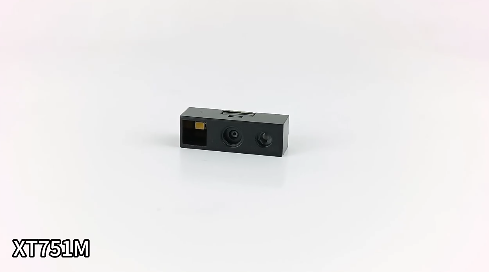
XT751M – Ultra Light Standard Model
| Feature | Specification |
|---|---|
| Weight | 1.2g |
| Resolution | 640×480 CMOS |
| Scan Speed | 300 scans per second |
| Interfaces | USB, TTL, RS232 |
| Best For | Clean QR codes on paper labels |
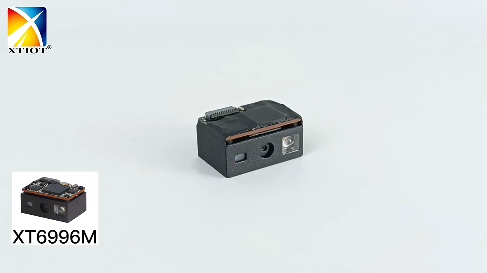
XT6996M – Premium High Resolution Model
| Feature | Specification |
|---|---|
| Weight | 3.9g |
| Resolution | 1280×800 CMOS |
| Scan Speed | 300 scans per second |
| Interfaces | USB |
| Best For | Tiny Data Matrix codes, phone screens, damaged labels |
Which Model Should You Choose?
| If you need... | Choose |
|---|---|
| Lowest cost, clean paper labels, standard codes | XT751M |
| Phone screen scanning, tiny codes, damaged or dirty labels | XT6996M |
Benefits for Printer Manufacturers
| Without Scan Engine | With XTIOT Scan Engine |
|---|---|
| Operator types data manually | Scan once, print many |
| Typing errors cause wrong codes | Zero typing errors |
| Slow on high volume lines | Fast batch printing |
| Operator needs training for each product | Scan any code, print any data |
| Printer is just a printer | Printer becomes a smart data capture device |
Integration for OEMs
Adding a scan engine to your handheld inkjet printer is straightforward:
Module fits inside existing printer housing
Simple wiring (USB, TTL, or RS232)
Basic integration with printer controller
XTIOT provides:
2D and 3D drawings for mechanical fit
SDK and API documentation
Engineering support for OEM customers
Custom cable length and pin assignment
Industries That Benefit
| Industry | Application |
|---|---|
| Warehouse | Scan pallet label, print putaway date on boxes |
| Manufacturing | Scan work order QR, print batch number on parts |
| Logistics | Scan shipping label, print handling instructions |
| Food processing | Scan lot number, print expiration date on boxes |
| Pharmaceutical | Scan Data Matrix, print serial number on vials |
| E commerce fulfillment | Scan order QR, print shipping date on package |
Call to Action
Are you a handheld inkjet printer manufacturer?
Add barcode scanning to your next printer model. XTIOT embedded scan engines are small, fast, and easy to integrate.
Contact us for sample modules and integration documentation.
#HandheldPrinter #QRScanEngine #InkjetScanner


