Shenzhen Xingtong IOT Technology Co., Ltd.
Barcode Scanner Manufacturer with development & Invention ability

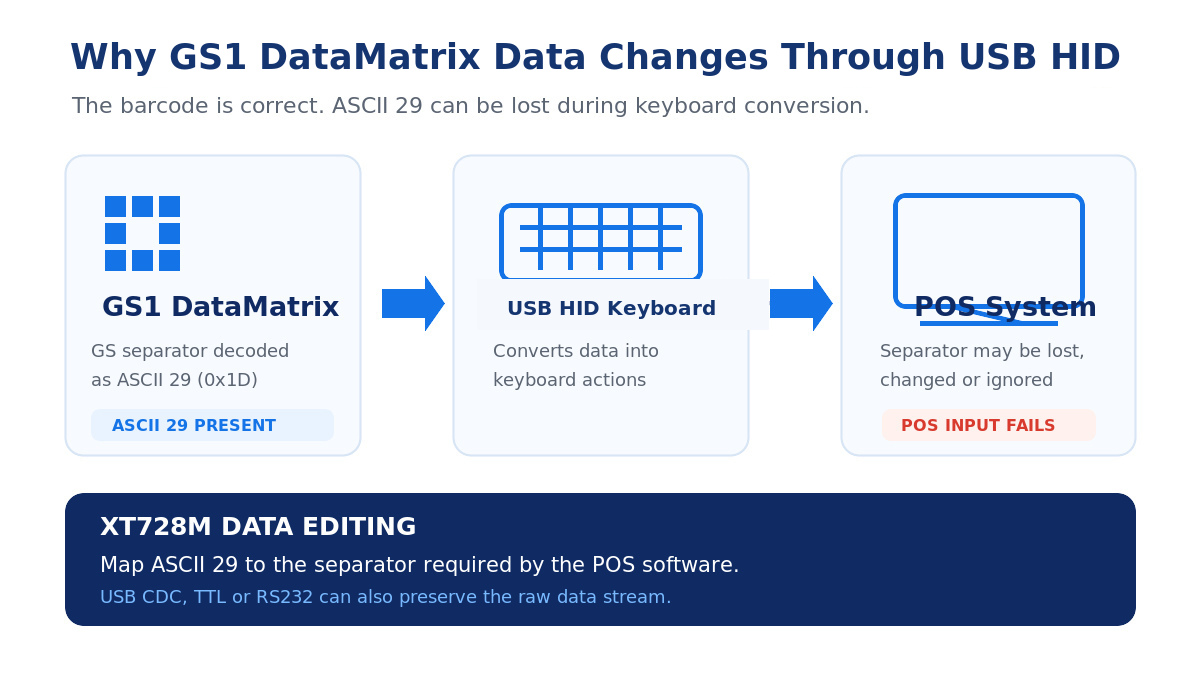
A customer recently scanned a GS1 DataMatrix code with the XT728M. The numbers were correct, but the POS system could not separate the product, batch and serial number fields.
The barcode was not wrong, and the scanner had decoded it correctly. The problem was the ASCII 29 separator.
Why ASCII 29 Disappears
GS1 DataMatrix uses ASCII 29 to separate variable-length data fields. It is a control character, not a normal visible character.
USB HID works by simulating keyboard input. Because a keyboard does not have an ASCII 29 key, the separator may be removed, changed or ignored before it reaches the POS software.
This is why the data can look complete in Notepad but still fail in the POS system.
How to Check the Output
Do not check only the visible text. Capture the scanner output in hexadecimal format and look for 1D, which is the hexadecimal value of ASCII 29.
The customer should also confirm the exact format required by the POS software. Some systems accept the original ASCII 29 character, while others require a visible separator such as | or a specific text string.
How XT728M Solves the Problem
If the host software can receive serial data, ASCII 29 can be transferred through USB CDC, TTL or RS232 without keyboard conversion.
If the POS system only accepts USB HID keyboard input, the XT728M data-editing firmware can convert ASCII 29 into the separator required by the customer’s software. The prefix, suffix and complete output format can also be adjusted for the project.
The correct solution is not to change the GS1 DataMatrix code. It is to match the scanner output format with the POS software.


