Shenzhen Xingtong IOT Technology Co., Ltd.
Barcode Scanner Manufacturer with development & Invention ability

What Hospital Self‑Service Kiosks Need
Self‑service kiosks for hospital registration, payment, and report printing must handle:
| Function | Code Type | Scanner Requirement |
|---|---|---|
| Patient registration | QR code from appointment SMS / hospital app | Reads from phone screen |
| Patient identification | Barcode on patient ID card or wristband | Reads 1D (Code128, Code39) or 2D (QR) |
| Insurance verification | QR on insurance card | Reads from plastic card or phone screen |
| Payment | Payment QR (Alipay, WeChat Pay, Apple Pay) | Reads from phone screen |
| Report retrieval | Barcode / QR on receipt or patient ID | Handheld scanner reads code; printer outputs report |
XTIOT Scanners for Hospital Kiosks
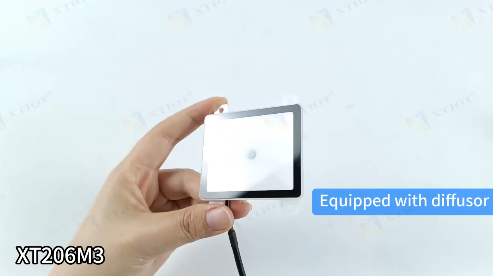
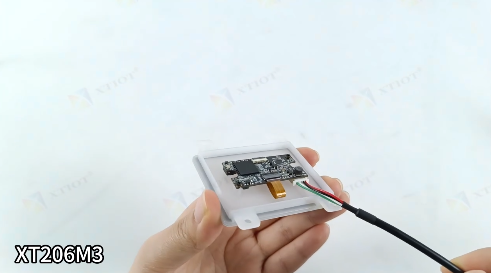
🔹 XT206M3 – Embedded Auto‑Sense Scan Module
Best for: Registration kiosk (fascia integration)
640×480 CMOS, reads 1D, 2D, QR, Data Matrix
Auto-sensing mode – patient holds phone under scanner, reads automatically – no trigger button
Optimized for phone screens – reads appointment QR from SMS / app even with dim screen, glare, screen protector
300 scans/sec – fast registration, no queue
Small footprint – fits into kiosk housing
USB, RS232, TTL – easy connection to kiosk PC
3V–5V operation – standard for embedded systems
Application: Patient scans appointment QR → system pulls registration data
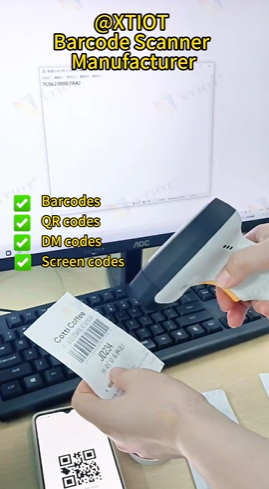
🔹 XT6202HD – Wireless Handheld Scanner
Best for: Report printing station (staff or patient self‑service)
2.4G wireless – connects to report printer kiosk
Reads 1D (Code128, EAN‑13) and 2D (QR, Data Matrix)
Reads from paper receipts – patient scans barcode on payment receipt
300 scans/sec
300mAh battery – 8+ hours
10–30m wireless range
Application: Patient scans receipt barcode → system retrieves report, prints
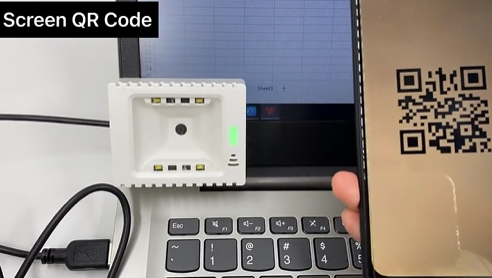
🔹 XT2002D – Payment QR Optimized Module
Best for: Hospital payment kiosk
Optimized for Alipay, WeChat Pay QR codes
Reads from dim phone screens, screen protectors
300 scans/sec
Hospital Kiosk Workflows
Registration Kiosk
Patient arrives at hospital
         ↓
Kiosk displays: "Scan appointment QR code from SMS or hospital app"
         ↓
Patient opens SMS / app → appointment QR appears on phone
         ↓
Patient holds phone under XT206M3 scanner
         ↓
Scanner reads QR (0.3 seconds)
         ↓
System pulls patient data: name, ID, doctor, time, department
         ↓
Registration confirmed → prints registration slip
Patient ID Card / Wristband Scan
Returning patient (no appointment) approaches kiosk
         ↓
Kiosk displays: "Scan patient ID card barcode or wristband"
         ↓
Patient holds ID card under scanner (or wristband)
         ↓
XT206M3 reads 1D / 2D barcode
         ↓
System retrieves patient record
         ↓
Patient proceeds to check symptoms / update info
Payment Kiosk
Patient completes visit → needs to pay bill
         ↓
Payment kiosk displays amount due
         ↓
Patient opens Alipay / WeChat Pay → payment QR appears on phone
         ↓
Patient holds phone under XT2002D scanner
         ↓
Payment processed → receipt printed with barcode
Report Printing Station
Patient has payment receipt with barcode
         ↓
Patient approaches report printing station
         ↓
Station displays: "Scan receipt barcode to print report"
         ↓
Patient uses XT6202HD wireless scanner to scan receipt barcode
         ↓
System retrieves lab results / medical report
         ↓
Report printed
Where Each Scanner Fits in Hospital Kiosk
| Kiosk Type | Scanner | Function |
|---|---|---|
| Registration kiosk | XT206M3 (embedded) | Scan appointment QR, patient ID barcode |
| Payment kiosk | XT2002D or XT206M3 | Scan payment QR from phone |
| Report printing station | XT6202HD (handheld) | Scan receipt barcode to retrieve report |
Why Engineers Choose XTIOT for Healthcare Kiosks
| Feature | Benefit for Hospital Applications |
|---|---|
| Auto-sensing mode | No button – patient just holds phone up |
| Reads phone screens reliably | Appointment QR works even with dim screen, glare |
| Reads 1D / 2D barcodes | Patient ID cards (Code128), wristbands (QR) |
| 300 scans/sec | Fast registration – no lobby queue |
| Wireless handheld (XT6202HD) | Report retrieval without bending to fixed scanner |
| Small footprint | Fits into kiosk housing |
| USB, RS232, TTL | Easy integration with hospital kiosk PC |
Example: Hospital Registration Kiosk
Hardware:
XT206M3 embedded in kiosk fascia
Receipt printer
Patient experience:
Patient receives SMS: "Your appointment QR code: [link]"
Arrives at hospital, approaches kiosk
Kiosk displays: "Scan QR code from SMS"
Patient opens SMS, holds phone under scanner
Scanner reads QR (0.3 seconds) → patient name, doctor, time appear
Patient confirms → registration slip printed
Patient proceeds to waiting area
Time: Under 30 seconds
Additional Use Cases
| Machine Type | Scanner Application |
|---|---|
| Pharmacy kiosk | Scan prescription QR to check status, pay, retrieve meds |
| Lab results station | Scan patient ID barcode to print test results |
| Insurance verification | Scan insurance card QR to verify coverage |
| Vaccination center | Scan appointment QR to register, print vaccination card |
Why This Matters for Hospital Operators
| Problem | XTIOT Solution |
|---|---|
| Manual registration takes 2‑3 minutes | QR scan – registration in 30 seconds |
| Typing errors in patient ID | Barcode scan – zero errors |
| Long queue at front desk | Self‑service kiosks reduce wait time |
| Patients lose payment receipt | Scan receipt barcode – retrieve report instantly |
| Patients can't find appointment confirmation | Scan QR from SMS – no typing required |
Need embedded QR scanners or wireless handhelds for your hospital self‑service kiosks? Contact XTIOT for engineering specs and integration support.
#HospitalKiosk #PatientRegistration #MedicalQRScanner #ReportPrinting #XT206M3


