Shenzhen Xingtong IOT Technology Co., Ltd.
Barcode Scanner Manufacturer with development & Invention ability

What Self‑Checkout Scanners Need
Self‑checkout kiosks must read three types of codes:
| Code Type | Example | Scanner Requirement |
|---|---|---|
| Product barcode | EAN‑13 on a cereal box | Reads from paper label, any orientation |
| Membership QR | Loyalty card QR on phone | Reads from phone screen |
| Payment QR | Alipay, WeChat Pay, Apple Pay | Reads from phone screen, fast, reliable |
XTIOT Scanners for Self‑Checkout
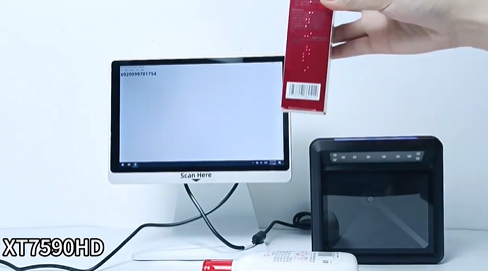
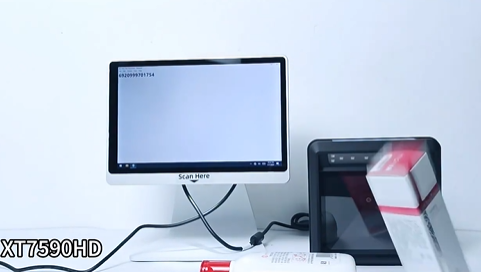
🔹 XT7590HD – Desktop Megapixel Scanning Platform
Best for: Full‑size self‑checkout stations
Megapixel global shutter CMOS – captures clear images of moving products
Reads 1D (EAN‑13, UPC, Code 128) and 2D (QR, Data Matrix, PDF417)
Reads phone screens – membership QR, payment QR
Continuous scan mode (auto‑sense) – no trigger needed
Plug‑and‑play USB – works with any POS or self‑checkout software
RS232 available for industrial POS systems
Application: Supermarket self‑checkout lane
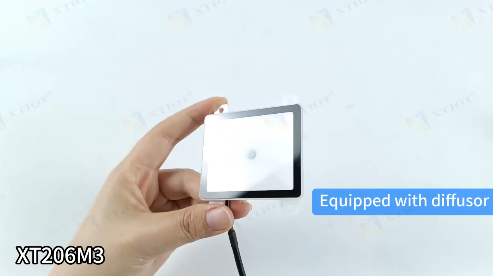
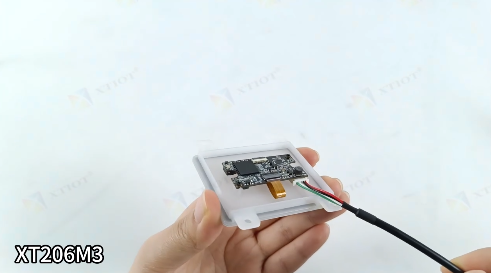
🔹 XT206M3 – Embedded 2D Scan Module
Best for: Compact self‑checkout kiosks, retrofit installations
640×480 CMOS, 300 scans/sec
Auto‑sensing mode – no trigger needed. Customer holds item or phone under scanner, it reads automatically
Reads from paper labels and phone screens
Small footprint – fits into slim kiosk housing
USB, RS232, TTL – easy connection to kiosk mainboard
Application: Small‑footprint self‑checkout, drugstore kiosk
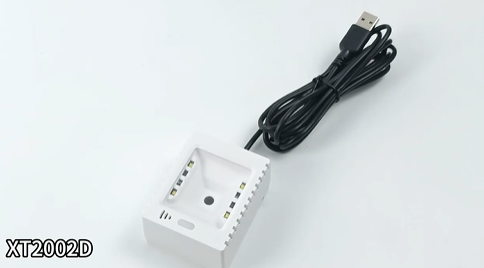
🔹 XT2002D – Payment QR Optimized Module
Best for: Self‑checkout payment stations
Specifically optimized for mobile payment QR codes – Alipay, WeChat Pay, Apple Pay, Google Pay
Reads from dim screens, screen protectors, glare
300 scans/sec
No SDK needed – plug and scan
Application: Standalone payment verification station
Self‑Checkout Workflow
Customer places item on scanning platform (XT7590HD)
         ↓
Scanner reads product barcode (0.3 seconds)
         ↓
Item appears on screen – customer continues scanning
         ↓
All items scanned → customer taps "Checkout"
         ↓
Customer scans membership QR from phone (XT7590HD or XT206M3)
         ↓
System applies discounts / loyalty points
         ↓
Customer opens payment app → payment QR appears on phone
         ↓
Customer holds phone under scanner (XT2002D or XT7590HD)
         ↓
Payment processed → receipt printed
Where Each Scanner Fits
| Kiosk Type | Recommended Scanner | Why |
|---|---|---|
| Full‑size supermarket self‑checkout | XT7590HD desktop platform | Global shutter, megapixel – fast moving item capture |
| Small‑footprint kiosk (drugstore, convenience store) | XT206M3 embedded module | Compact, auto‑sense |
| Dedicated payment station | XT2002D | Optimized for payment QR |
| Retrofit existing POS | XT7590HD (USB) | Plug‑and‑play, no driver |
Why Engineers Choose XTIOT for Self‑Checkout
| Feature | Benefit |
|---|---|
| Global shutter (XT7590HD) | No image distortion – reads moving items clearly |
| Megapixel resolution | Captures small / high‑density barcodes |
| Auto‑sensing mode | No trigger button – just hold item under scanner |
| Phone screen optimization | Reads membership & payment QR reliably, even with dim screens or glare |
| Fast decoding | 300 scans/sec – no customer waiting |
| Multiple integration options | Desktop platform OR embedded module |
| USB plug‑and‑play | Works with any POS software |
| RS232 available | For industrial POS systems |
Example: Supermarket Self‑Checkout Lane
Hardware setup:
XT7590HD desktop scanner mounted flush in checkout counter
XT2002D embedded module for payment QR (or built into same XT7590HD)
Customer experience:
Customer places cereal box on scanning platform → XT7590HD reads EAN‑13 instantly
Scans yogurt, milk, bread – same fast process
Scans loyalty QR from phone → discount applied
Scans payment QR from phone → transaction complete
Total time: Under 2 minutes for 15 items
Why This Matters for Self‑Checkout Deployments
| Problem | XTIOT Solution |
|---|---|
| Customers struggle to align barcodes | Omnidirectional reading (platform design) |
| Payment QR won‘t scan from phone | Optimized for screen codes – works with glare, dim screens |
| Slow scanning creates long lines | 300 scans/sec – keeps customers moving |
| Moving items cause blur | Global shutter captures clear image of moving products |
| Kiosk space is limited | Small‑footprint embedded modules available |
Need a barcode scanner for your self‑checkout kiosk? Contact XTIOT for engineering specs and integration support.
#SelfCheckoutScanner #DesktopQRReader #PaymentCodeScan #EmbeddedScanModule #XT7590HD


