Shenzhen Xingtong IOT Technology Co., Ltd.
Barcode Scanner Manufacturer with development & Invention ability

What Currency Exchange Kiosks Need
Self‑service currency exchange machines (forex kiosks) allow customers to:
| Function | How Scanning Helps |
|---|---|
| Pay for currency | Customer scans QR code from mobile payment app (Alipay, WeChat Pay, local payment apps) |
| Receipt retrieval | Kiosk prints receipt with QR code – customer scans later to retrieve exchange record |
| Exchange rate confirmation | Scan promotional QR code to display current rate before starting transaction |
XTIOT Fixed Mount Scanners for Currency Exchange Kiosks
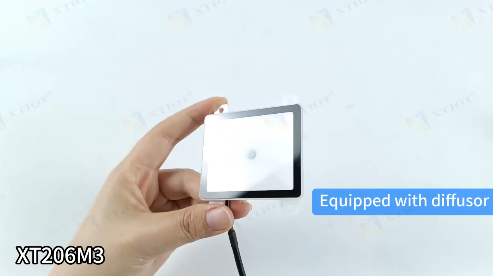
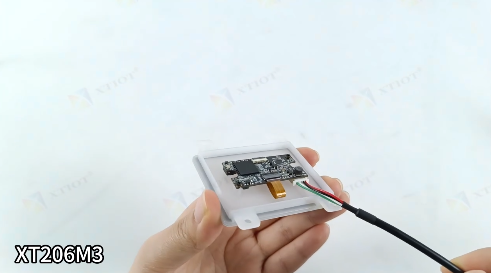
🔹 XT206M3 – Auto‑Sense Scanner for Payment QR
640×480 CMOS, reads 1D/2D/QR/Data Matrix
Auto‑sensing mode – customer holds phone up, scanner reads automatically – no trigger button
Optimized for phone screens – reads dim screens, screen protectors, glare
300 scans/sec – fast payment confirmation
USB, RS232, TTL – simple connection to kiosk mainboard
Small footprint – fits into kiosk fascia panel
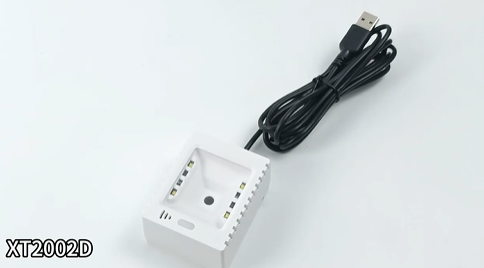
🔹 XT2002D – Payment QR Optimized Module
Specifically optimized for mobile payment QR codes – Alipay, WeChat Pay, Apple Pay, Google Pay
Reads from any phone brightness level
No SDK needed for basic operation – plug and scan
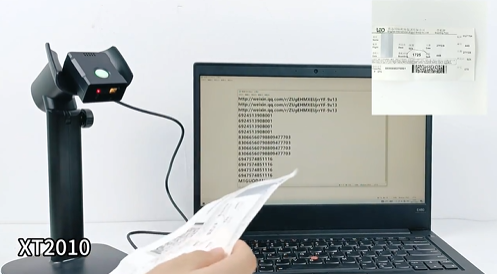
🔹 XT2010 – Fixed Mount for High‑Volume Kiosks
300 scans/sec, 640×480 CMOS
Multiple read modes: trigger, induction, continuous, command
USB, RS232, TTL
-20°C to +60°C operating range
Kiosk Integration – Where Scanners Are Used
| Location | Scanner Type | Function |
|---|---|---|
| Payment area | XT206M3 or XT2002D | Scan customer payment QR code |
| Receipt printer slot | XT206M3 | Customer scans receipt QR for record retrieval |
| Promotional display | Any QR reader | Scan for live exchange rate |
Simple Workflow
QR Payment at Currency Exchange Kiosk
Customer selects currency and amount on kiosk screen
         ↓
Kiosk displays total amount and QR code for customer to scan? Wait – that‘s backwards.
Correction: In most currency exchange kiosks, the customer does NOT scan a QR code displayed on the kiosk screen. Instead:
Customer opens payment app on their phone
Kiosk displays amount due
Customer holds phone up to kiosk scanner window
Kiosk scanner reads the QR code from customer‘s phone
Payment processed
Corrected workflow:
Customer selects currency and amount on kiosk screen
         ↓
Kiosk displays: "Please scan payment QR code from your payment app"
         ↓
Customer opens Alipay / WeChat Pay / banking app → payment QR code appears on phone
         ↓
Customer holds phone up to kiosk scanner window
         ↓
Embedded XT206M3 reads QR code in 0.3 seconds
         ↓
Payment processed → kiosk dispenses foreign currency
         ↓
Receipt printed with QR code for future record lookup
Receipt QR Scanning
After transaction, customer may need to retrieve exchange record later.
Workflow:
Kiosk prints receipt with embedded QR code
         ↓
Customer scans receipt QR with phone → opens exchange record page
         ↓
Customer can also scan same receipt QR at another kiosk (using same scanner hardware) to retrieve transaction history
Why Engineers Choose XTIOT for Currency Exchange Kiosks
| Feature | Benefit for Forex Kiosks |
|---|---|
| Auto‑sensing mode | No trigger button – customer just holds phone up |
| Reads phone screens reliably | Works with dim screens, screen protectors, glare |
| Fast response | 300 scans/sec – no customer wait |
| Small footprint | Fits inside kiosk fascia |
| Multiple interfaces | USB, RS232, TTL – connect to any mainboard |
| Wide operating temp | -20°C to +60°C – works in outdoor kiosks |
| No SDK for basic use | Plug and scan – drop‑in replacement |
Example: Airport Currency Exchange Kiosk
Airport forex kiosk has XT206M3 embedded in payment panel.
Customer experience:
Selects "USD 500" on screen
Opens Alipay → payment QR appears
Holds phone under scanner window
Scanner reads QR → payment deducted
USD 500 dispensed + receipt printed with QR
Total time: Under 30 seconds
Why This Matters for Kiosk Manufacturers
| Problem | XTIOT Solution |
|---|---|
| Payment QR won‘t scan from phone screen | Dedicated screen code optimization |
| Customers take too long to position phone | Auto‑sense + wide field of view |
| Receipt lookup requires separate system | QR on receipt – self‑service retrieval |
| Kiosk space is limited | Ultra‑compact module |
Need an embedded QR scanner for your currency exchange kiosk? Contact XTIOT for engineering specs and integration support.
#CurrencyExchangeKiosk #QRPaymentScanner #ForexKiosk #EmbeddedQRModule #XT206M3


